Traditional Chinese Localization Is More Than Character Conversion: What App Teams Need to Know About Taiwan and Hong Kong
Last Updated on 24 September 2026
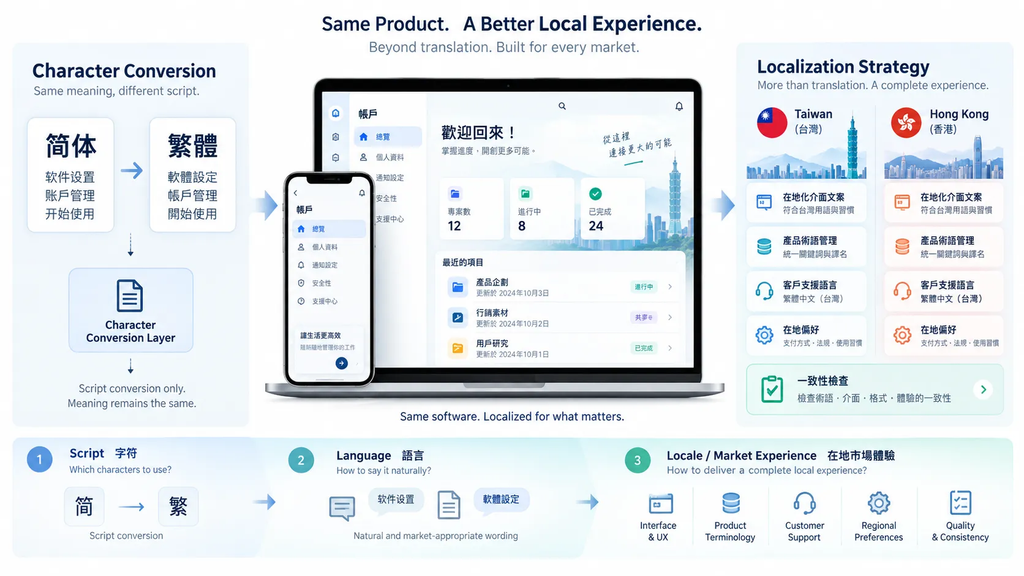
A software product can pass a translation review and still create friction for users.
The reason is simple: localization is not only about converting words. It is about making sure language, terminology, and user expectations match the market where the product is being used.
This challenge becomes especially interesting with Traditional Chinese. Many product teams treat Traditional Chinese as a single localization target because Taiwan and Hong Kong share the same writing system. While that assumption can simplify early translation work, it often creates problems when software reaches real users.
The characters may look correct, but the experience may still feel unfamiliar.
Good localization is not simply about changing characters. It is about reducing the amount of interpretation users need to do.
Traditional Chinese Is a Script Choice, Not a Complete Localization Strategy
Traditional Chinese tells a product team which writing system should be displayed, but it does not automatically define regional terminology, user expectations, or product vocabulary.
A complete localization process involves script, language, locale, and product terminology.
These layers interact, but they are not identical.
A product can use Traditional Chinese characters while still feeling unfamiliar because its terminology was selected for another market.
—
Where Character Conversion Stops and Localization Begins
Character conversion is useful, but it cannot decide whether a product feels local.
Users judge software by terminology, workflow, and consistency across the entire experience.
A translated sentence may be grammatically correct while still using wording that feels unusual for the target audience.
The stronger question is not only whether users understand the words, but whether they naturally expect the product to describe the feature that way.
UI Language, Message Language, and Input Language Are Different Experiences
Messaging applications show why language layers should be separated.
Interface language controls menus, buttons, and settings.
Message language depends on conversations.
Input language depends on the keyboard or input method.
A user searching for Telegram 繁體中文版 may simply want a localized interface experience rather than a separate application.
Why Consistent Product Terminology Matters Across Every Screen
Modern applications appear across mobile apps, desktop clients, websites, help centers, emails, and support systems.
Without shared terminology rules, different teams can create different names for the same feature.
A terminology system helps maintain consistency across every user touchpoint.
Localization Breaks When Every Team Creates Its Own Vocabulary
Mobile teams, support teams, marketing teams, and AI tools may unintentionally create different wording for the same concept.
This creates terminology drift.
A common example is when one device, help article, and support response use different names for the same setting.
A Telegram 中文設定指南 can be a practical example of why interface preferences, message translation, and account synchronization should be treated as separate layers.
AI Speeds Up Translation, but It Does Not Create Language Rules
Generative AI can accelerate translation, but it does not automatically understand a company’s preferred terminology.
AI should work with approved language rules, product glossaries, and localization standards.
Otherwise, it may produce multiple acceptable but inconsistent translations.
High-Value Screens Need Localization Reviews First
Teams should begin reviews with important user journeys:
– onboarding
– account settings
– notifications
– payments
– customer support
These areas create the most user impact.
Localization QA Should Follow User Tasks
Users do not experience software one sentence at a time.
They complete tasks.
A better localization review asks whether users can complete actions naturally across the entire workflow.
Localization Requires Version Control After Launch
Localization is not finished when software ships.
New features, UI changes, and AI-generated content can introduce terminology drift.
Teams should maintain:
– approved terminology
– previous translations
– product naming rules
– market-specific decisions
A Five-Screen Localization Audit
A practical audit can review:
1. Account creation
2. Profile management
3. Notifications
4. Payments
5. Customer support
The goal is not to make every market identical.
The goal is to make every market feel intentionally supported.
Good Localization Becomes Almost Invisible
Users rarely notice excellent localization.
They simply complete their tasks.
Poor localization forces users to stop, reread, and interpret.
Traditional Chinese markets demonstrate why localization requires more than character conversion.
The writing system is only the beginning.
Successful localization combines appropriate terminology, consistent product language, clear user flows, coordinated updates, and continuous quality reviews.