How to Reimagine Photos in Different Eras with AI
Last Updated on 2 September 2026
There’s a specific kind of fun in wondering what you’d have looked like as a disco-era regular in the 1970s, or a sharp-suited professional in the 1980s, or a flapper dancing through the 1920s. It’s a curiosity almost everyone shares, but actually seeing yourself, or a photo of someone you know, transformed into a different decade used to be limited to costume parties and imagination. An AI image generator makes that leap genuinely visual, taking a real photo and reimagining it as though it belonged to an entirely different era.
Dreamina, running on its most advanced image generation model, Seedream 5.0 Pro, is especially good at this kind of transformation, since it can preserve someone’s actual likeness while completely reworking the styling, setting, and photographic quality around them. Here’s exactly how to send a photo back, or forward, in time.
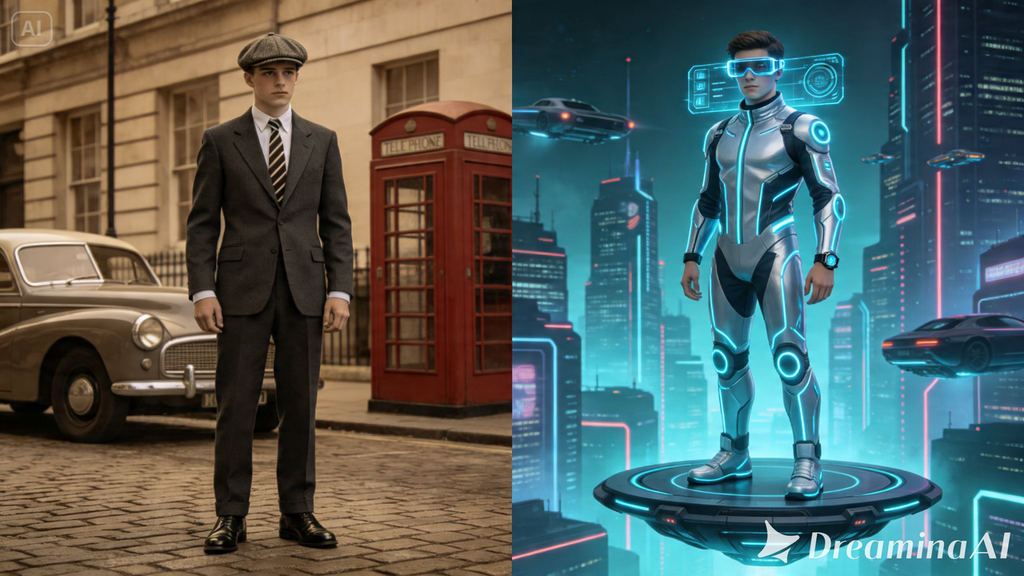
Same face, completely different decade
The core technique here relies on keeping a person’s actual identity- their face, features, general likeness- consistent while everything surrounding them shifts to match a different era. This is fundamentally different from generating a fictional vintage character from scratch.
The goal is recognition: someone looking at the result should still see the same person, just transported somewhere else in time.
Why a strong reference photo matters more than usual
Since preserving someone’s actual likeness is the whole point of this technique, the quality and clarity of your original reference photo carries more weight here than in most other kinds of generation.
A clear, well-lit, front-facing photo gives the model the strongest foundation to work from. A blurry, heavily shadowed, or extreme-angle photo makes it much harder to maintain accurate likeness once styling and setting change dramatically around it.
Choosing an era that suits the person, not just a trend
It’s tempting to default to whichever decade feels most visually exciting, but the strongest results often come from picking an era that actually complements the person’s features or the mood you’re going for.
Someone with sharp, angular features might suit the bold geometric styling of the 1960s particularly well, while softer features might translate beautifully into 1930s glamour photography.
There’s no strict rule here, but it’s worth experimenting rather than assuming one decade fits everyone equally.
Your 3-step time shift with Dreamina
Once you’ve chosen your era and gathered a strong reference photo, here’s exactly how to transform.
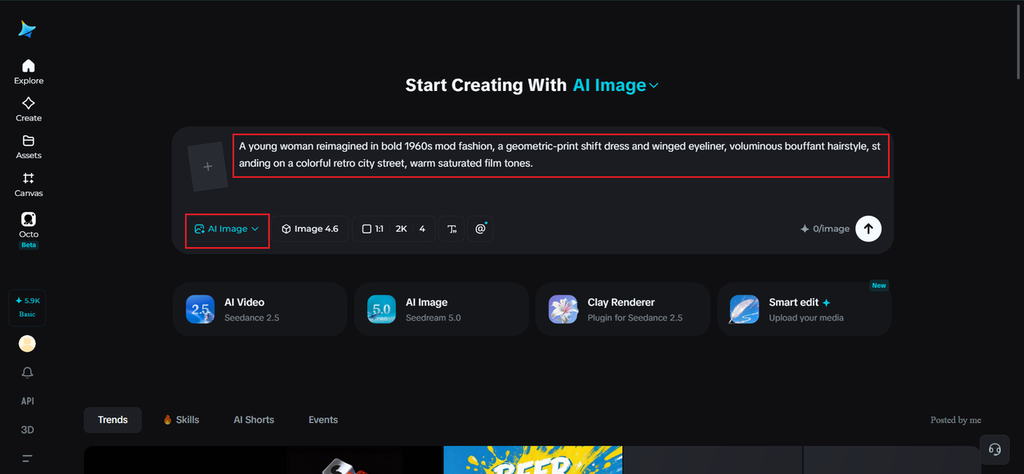
Step 1: Write a text prompt and/or add a reference image
Navigate to Dreamina and write a detailed text prompt describing the person dressed appropriately for your chosen decade, including specific fashion, hairstyle, and setting details for that era. Upload a clear reference image of the actual person, so Dreamina has an accurate likeness to preserve throughout the transformation.
A detailed sample prompt might be: A young woman reimagined in bold 1960s mod fashion, a geometric-print shift dress and winged eyeliner, voluminous bouffant hairstyle, standing on a colorful retro city street, warm saturated film tones.
Being specific about hairstyle and fashion, not just clothing color, helps the era read as accurate rather than approximate.
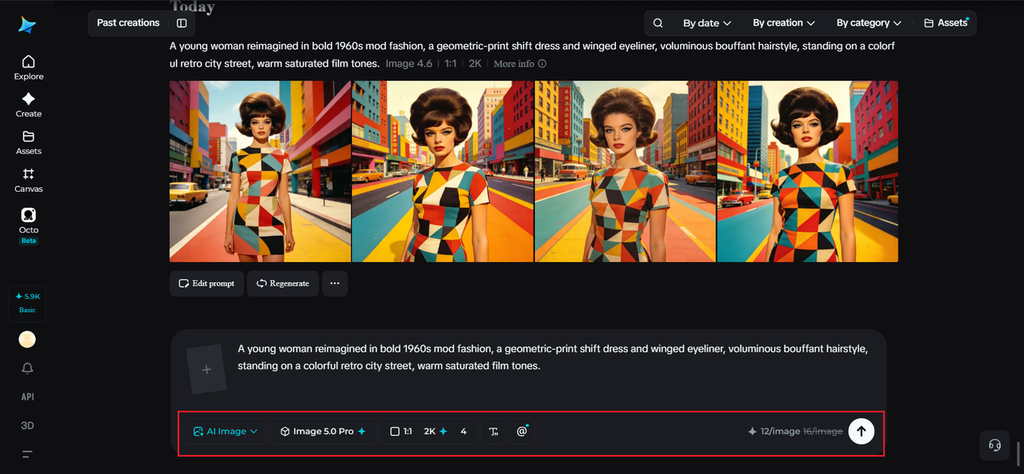
Step 2: Adjust parameters and generate
Before generating, set your parameters. Choose Image 5.0 Pro, powered by Seedream 5.0 Pro, as your model, then select your aspect ratio, image size, and resolution, keeping the ratio similar to your original reference photo for the most natural likeness preservation, and using 2K resolution to keep facial detail sharp. Click Dreamina’s generate icon to produce your era-shifted image.
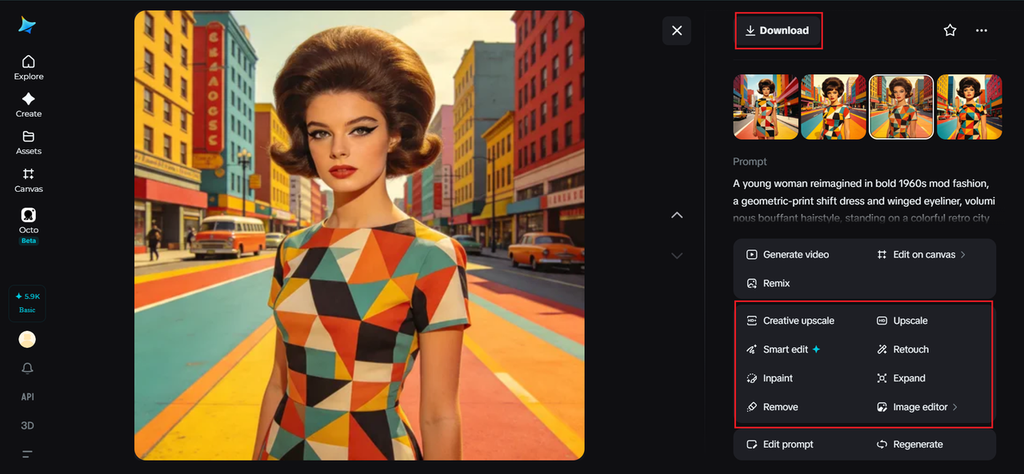
Step 3: Customize and download
Once your image generates, compare it closely against the original reference to check that the likeness held up, then use Dreamina’s AI customization tools to refine it — inpaint to adjust any facial detail that shifted too far from the original, expand to reveal more of the period-accurate setting, remove to eliminate anything anachronistic, and retouch to balance the overall era-appropriate color and tone. When the transformation feels both accurate to the person and convincing for the decade, click the Download icon to save it.
Meet Seedream 5.0 Pro: built to preserve identity through transformation
A few of Seedream 5.0 Pro’s specific capabilities make this exact technique work reliably.
Pinpoint precision editing for facial accuracy
With point selection, lasso, sketch guidance, and regional controls, pinpoint precision editing lets you make small corrections to keep facial features accurate to the original person even as everything else transforms around them.
Multi-layer visual control for isolating identity from styling
Multi-layer visual control separates the subject from background, wardrobe, and effects, which is especially useful here since it allows the person’s core likeness to remain stable while fashion and setting shift entirely.
Deep reasoning generation for coherent period styling
Deep reasoning generation analyzes your prompt’s relationships and intent before producing an image, helping ensure hairstyle, fashion, and setting details all belong convincingly to the same decade rather than mixing eras.
2K output for facial detail that holds up
Since maintaining recognizable likeness depends on fine facial detail, 2K output quality ensures those features stay sharp and accurate rather than getting lost in the broader stylistic transformation.
Building out a full decade-by-decade series
Once you’ve nailed the technique for one era, it’s a natural next step to generate the same person across several decades, creating a genuine visual timeline. Keeping the reference image and prompt structure consistent while only swapping era-specific details produces a cohesive set that reads as one continuous transformation rather than disconnected experiments.
Final thoughts
Wondering what you’d look like in another decade doesn’t have to stay hypothetical anymore, not with a clear reference photo and the right AI image generator to handle the transformation.
With Dreamina and its advanced Seedream 5.0 Pro model, that likeness stays intact while the era around it shifts completely and convincingly.
Pick your favorite decade, gather a strong reference photo, and let Dreamina send that image somewhere else in time.