How to Generate High-Quality AI Headshots for LinkedIn Profile Pictures
Last Updated on 31 December 2025
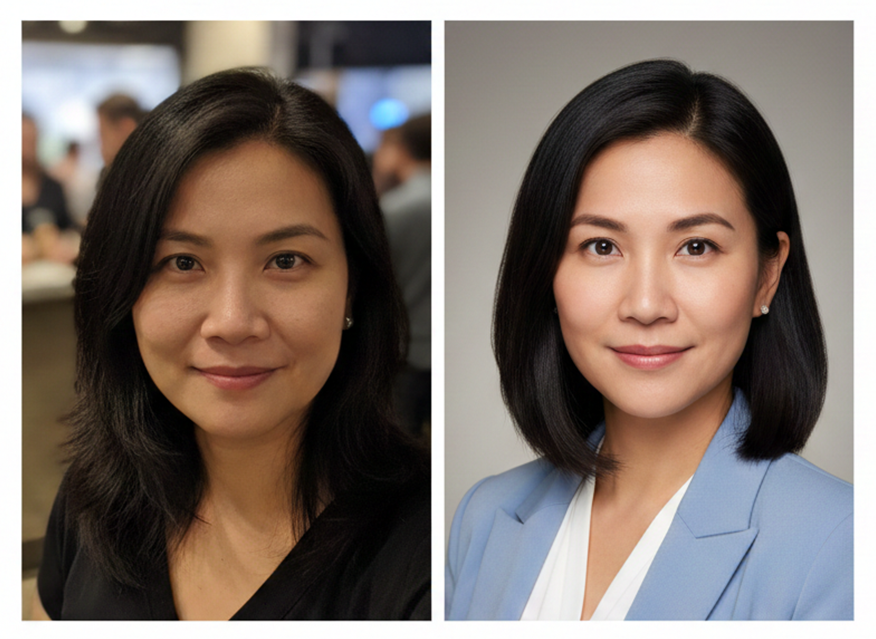
Your LinkedIn photo is doing more work than you think.
Before someone reads your headline, scans your experience, or checks your connections, they see your face. And in that split second, they’re making judgments. Trustworthy or sketchy. Competent or amateur. Worth connecting with or worth skipping.
A Microsoft study found that it takes just 100 milliseconds to form a first impression from a photo. That’s faster than a blink.
Here’s the problem: most LinkedIn photos are terrible. Cropped vacation shots. Blurry selfies. That one from your cousin’s wedding where you looked “pretty good.” I’ve seen executives with seven-figure salaries using profile pictures that look like they were taken on a flip phone in 2009.
The good news? AI headshot generators have gotten remarkably good. The bad news? Most people use them wrong.
I’ve spent considerable time studying what separates a LinkedIn photo that opens doors from one that closes them. Here’s what actually works when generating AI headshots and what most guides won’t tell you.
Why Your Current Photo Probably Isn’t Working
Let’s start with an uncomfortable truth: you’re not objective about your own face.
That photo you love? The one where you think you look approachable and successful? Your brain is lying to you. We’re hardwired to prefer images of ourselves that match our internal self-image, not necessarily the ones that communicate competence to strangers.
This is called the “mere exposure effect.” The more you see something, the more you like it. You’ve seen your own face thousands of times, so you’re drawn to photos that feel familiar.
But here’s what matters: recruiters, potential clients, and business connections aren’t looking for “familiar.” They’re looking for signals. Professionalism. Energy. Someone worth their time.
The real question isn’t “do I like this photo?” It’s “what does this photo communicate to someone who doesn’t know me?”
The AI Headshot Advantage (When Done Right)
Traditional professional photography has its place. But for most professionals, it comes with friction: scheduling, traveling to a studio, awkward posing, waiting for edits, paying $200-500 for a single session.
AI headshot generators remove that friction entirely. Upload some reference photos, and algorithms trained on millions of professional images generate polished results. No scheduling. No travel. Fraction of the cost.
But this accessibility creates a new problem.
Because AI tools are so easy to use, people treat them casually. They upload random selfies, pick whatever output looks “cool,” and call it done. The result? AI headshots that look obviously artificial, weirdly smooth, or just… off.
Here’s what most people miss: AI is only as good as what you give it.
The quality of your input photos determines everything. The settings you choose matter. And knowing what to look for in the final output separates a professional-looking result from one that screams “I used an AI tool and didn’t think twice about it.”
Step 1: Choose the Right Input Photos
This is where 80% of bad AI headshots originate.
Most people grab whatever photos they have on their phone, group shots, vacation pics, random selfies with weird lighting. Then they’re surprised when the AI produces something that looks nothing like them.
What actually works:
- Multiple angles. Give the AI 8-15 photos showing your face from different perspectives. Front-facing, slight left, slight right. This helps the model understand your actual facial structure.
- Consistent lighting. Natural daylight is ideal. Avoid harsh overhead lights, dramatic shadows, or mixed lighting sources. The AI learns from patterns inconsistent lighting creates inconsistent results.
- Neutral expressions. You want a slight, natural smile, not a forced grin or a stone-faced stare. Think “pleasant” rather than “passport photo.”
- Recent photos. If you’ve changed significantly in the last year, new hairstyle, glasses, weight change – use current images. The AI can’t magically know what you look like now.
What to avoid:
- Sunglasses or hats covering your face
- Heavy filters or edited photos (the AI is already doing the editing)
- Group shots where your face is small or partially obscured
- Extreme expressions that distort your features
I’ve seen people upload five blurry selfies and expect magic. That’s not how this works. Garbage in, garbage out.
Step 2: Understand What “Professional” Actually Means
Here’s where things get nuanced.
“Professional” doesn’t mean the same thing across industries. A tech startup founder and a corporate attorney need different visual signals. A creative director and an accountant communicate competence differently.
Before generating your headshot, ask yourself: what does professionalism look like in my specific context?
For corporate/traditional industries:
- Classic business attire (blazer, collared shirt)
- Neutral backgrounds (gray, soft blue, professional office)
- Composed, confident expression
- Conservative styling
For creative/startup environments:
- Smart casual works fine
- More personality in expression
- Environmental backgrounds can work
- Authenticity matters more than polish
For customer-facing roles (sales, consulting, coaching):
- Warmth and approachability are key
- Genuine smile over serious stare
- Eye contact that builds trust
Most AI headshot tools let you select styles, backgrounds, and attire. Don’t just pick what looks “nice” – pick what matches your professional context. AI Headshot Generator – Headshot Photo provides many backgrounds and outfit styles.
If you’re evaluating different options, comparing AI headshot generators can help you find tools that specialize in your specific needs. Some excel at corporate styles, others at creative looks.
Step 3: The Details That Separate Good from Great
Once you’ve generated your AI headshots, don’t just pick the first one that looks decent.
Check these elements:
Eyes. This is the most important element. The eyes should look natural, focused, and engaged. AI sometimes struggles with eye direction or creates a slightly glazed look. If the eyes feel “off,” skip that image.
Symmetry. Minor asymmetries are natural and actually make faces more trustworthy. But AI can sometimes create perfect symmetry that lands in uncanny valley territory. Look for a natural, human balance.
Hair and edges. Zoom in on hairlines, ears, and the edges of clothing. AI occasionally produces artifacts – weird blending, missing details, or unnatural textures. These are subtle but noticeable to viewers.
Background consistency. Make sure the background doesn’t have strange elements, blurring inconsistencies, or objects that look generated rather than real.
Skin texture. Over-smoothed skin looks artificial. You want a result that reduces blemishes naturally without making you look like a plastic mannequin.
The uncanny valley test: Show the image to someone who’s never seen you before. Ask if anything feels “off” about the photo. Fresh eyes catch things you’ll miss.
Step 4: Optimize for LinkedIn Specifically
LinkedIn has specific requirements and best practices that differ from other platforms.
Technical specs:
- Recommended size: 400 x 400 pixels minimum (LinkedIn will crop to circle)
- Supported formats: JPG, PNG, GIF
- Maximum file size: 8MB
Composition considerations:
- Your face should occupy 60-70% of the frame
- Leave breathing room above your head
- Slight body angle (rather than straight-on) creates visual interest
- Background shouldn’t be distracting or cluttered
Platform-specific context: LinkedIn users scroll quickly. Your photo appears as a small circle in feeds, connection requests, and messages. It needs to read well at thumbnail size, which means high contrast and a face that stands out from the background.
For professionals specifically focused on LinkedIn optimization, dedicated LinkedIn headshot tools are designed with these platform-specific requirements in mind.
The Psychology of What Actually Works
After analyzing countless LinkedIn profiles, certain patterns emerge in photos that generate positive responses.
The “approachable expert” balance. You want to look competent but not intimidating. The most effective photos convey both warmth (slight smile, open expression) and credibility (professional attire, quality image).
Direct eye contact. Looking directly at the camera creates a sense of connection. It signals confidence and openness. Profiles with direct eye contact receive significantly more engagement.
Appropriate energy. Your expression should match the energy level of your industry. High-energy for sales and creative roles. Measured confidence for executive and corporate positions.
Authenticity signals. Paradoxically, the photos that feel most “real” perform best even when they’re AI-generated. This means avoiding over-editing, unrealistic perfection, or styles that don’t match who you actually are.
The Bottom Line
Your LinkedIn photo isn’t vanity. It’s strategy.
In a platform where first impressions happen before a single word is read, your headshot is doing heavy lifting. It’s either opening doors or quietly closing them.
AI headshot generators have democratized access to professional-quality images. You no longer need to spend hundreds on a photographer to look credible online. But the tool is only as good as the intention behind it.
Choose input photos deliberately. Select styles that match your context. Evaluate outputs critically. Optimize for the platform.
Do those four things, and you’ll have a LinkedIn photo that works as hard as you do.